Paper Keyword Analysis
Search terms are represented as nested lists. The outer list is interpreted as
AND; inner lists are interpreted as synonyms with OR.
The examples below use the query:
Artificial Intelligence AND Quantum Computing AND Chemistry.
PubMed
from paperscraper.pubmed import get_and_dump_pubmed_papers

ai = ["Artificial intelligence", "Machine learning"]
qc = [
    "Quantum computing", "Quantum computer", "Quantum information",
    "Quantum algorithm", "Quantum circuit", "Quantum simulation",
    "Quantum machine learning", "Qubit", "Quantum annealing",
]
chemistry = ["Chemistry", "Chemical", "Molecule", "Molecular", "Materials science"]
query = [ai, qc, chemistry]

get_and_dump_pubmed_papers(query, output_filepath="ai_quantum_chemistry.jsonl")
Use get_pubmed_papers when you want a DataFrame in memory instead of a JSONL
file. PubMed can also return author emails when "emails" is included in
fields.
from paperscraper.pubmed import get_pubmed_papers

papers = get_pubmed_papers(
    "(machine learning) AND (zoology)",
    fields=["title", "doi", "emails"],
    max_results=50,
)
Date bounds and custom fields are available on the dump helper:
get_and_dump_pubmed_papers(
    query,
    output_filepath="pubmed_ai_quantum_chemistry_2024.jsonl",
    fields=["title", "authors", "date", "doi", "emails"],
    start_date="2024/01/01",
    end_date="2024/12/31",
)
arXiv
from paperscraper.arxiv import get_and_dump_arxiv_papers

get_and_dump_arxiv_papers(query, output_filepath="ai_quantum_chemistry.jsonl")
Use date bounds and backend="infer" when you want paperscraper to use a local
arXiv dump if one exists, otherwise fall back to the API:
get_and_dump_arxiv_papers(
    query,
    output_filepath="arxiv_ai_quantum_chemistry_2024.jsonl",
    start_date="2024-01-01",
    end_date="2024-12-31",
    backend="infer",
)
Use get_arxiv_papers_api when you want arXiv API results as a DataFrame:
from paperscraper.arxiv import get_arxiv_papers_api

papers = get_arxiv_papers_api('all:"quantum machine learning"', max_results=25)
bioRxiv, medRxiv, and chemRxiv
Download local xRxiv dumps once using the
setup instructions, then restart Python so
paperscraper.load_dumps can discover the new files.
For local xRxiv dumps, use XRXivQuery directly:
from paperscraper.xrxiv.xrxiv_query import XRXivQuery

querier = XRXivQuery("server_dumps/chemrxiv_2020-11-10.jsonl")
querier.search_keywords(query, output_filepath="ai_quantum_chemistry.jsonl")
QUERY_FN_DICT is mostly internal. It can be useful if you want to query only
one specific preprint server after local dumps have been downloaded:
from paperscraper.load_dumps import QUERY_FN_DICT

QUERY_FN_DICT["biorxiv"](query, output_filepath="biorxiv_ai_quantum_chemistry.jsonl")
QUERY_FN_DICT["chemrxiv"](query, output_filepath="chemrxiv_ai_quantum_chemistry.jsonl")
To run several queries across all available backends:
from paperscraper import dump_queries

physics = [
    "Physics", "Physical", "Particle", "Condensed matter",
    "Many-body", "Fermion", "Hamiltonian", "Spin",
]
biology = ["Biology", "Biological", "Cellular", "Genomics", "Gene", "Protein"]
queries = [[ai, qc, chemistry], [ai, qc, physics], [ai, qc, biology]]

dump_queries(queries, ".")
Google Scholar
Google Scholar uses a plain text query:
from paperscraper.scholar import get_and_dump_scholar_papers

get_and_dump_scholar_papers("Machine Learning", "scholar_machine_learning.jsonl")
Use get_scholar_papers when you want the search results as a DataFrame:
from paperscraper.scholar import get_scholar_papers

papers = get_scholar_papers(
    "GT4SD",
    backend="searchapi",
    search_api_kwargs={"top_k": 5, "num_enrich": 1},
)
Set SEARCH_API_KEY to use the SearchApi backend. top_k controls the number
of matches to return and num_enrich controls how many of those receive extra
author-profile lookups for full abstracts, author lists, journals, and citation counts.
Set it to 0 for a single SearchApi request but then your result will merely reflect
the content Google Scholar shows you here, i.e., all information is truncated.
NOTE: Google Scholar does not use the nested Boolean query syntax. It follows the search behavior of the Google Scholar search box.
Plotting
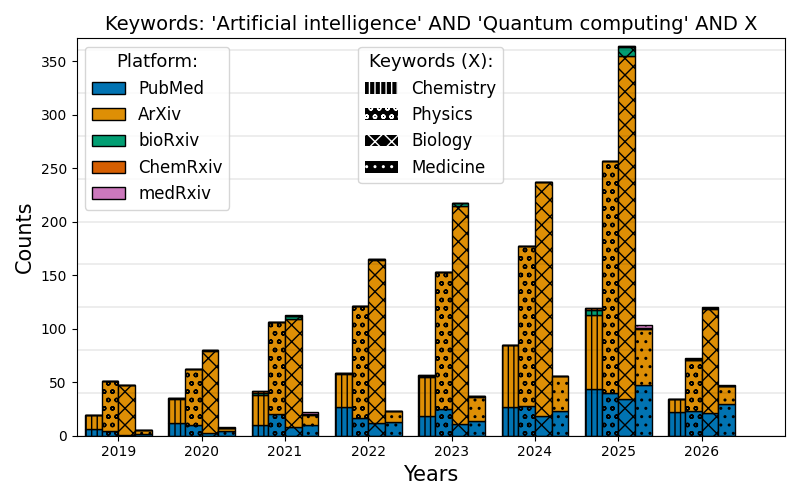
After aggregating keyword-analysis results, you can visualize temporal trends and overlaps.
Bar Plots
Use aggregate_paper to bin matched papers by year, then pass the aggregated
counts to plot_comparison. aggregate_paper can also remove false positives
with unwanted_keys or restrict filtering to titles with filter_abstract=False.
This compact workflow loops over every available backend via QUERY_FN_DICT.
import os

from paperscraper import QUERY_FN_DICT
from paperscraper.postprocessing import aggregate_paper
from paperscraper.utils import get_filename_from_query, load_jsonl

medicine = ["Medicine", "Medical", "Clinical", "Disease", "Patient", "Health"]
queries = [
    [ai, qc, chemistry],
    [ai, qc, physics],
    [ai, qc, biology],
    [ai, qc, medicine],
]

root = "../keyword_dumps"
data_dict = {}

for query in queries:
    filename = get_filename_from_query(query)
    data_dict[filename] = {}

    for db, _ in QUERY_FN_DICT.items():
        data = load_jsonl(os.path.join(root, db, filename))
        data_dict[filename][db], _filtered = aggregate_paper(
            data,
            2019,
            bins_per_year=1,
            filtering=True,
            filter_keys=query,
            return_filtered=True,
            last_year=2026,
        )
from paperscraper.plotting import plot_comparison

data_keys = [
    "artificialintelligence_quantumcomputing_chemistry.jsonl",
    "artificialintelligence_quantumcomputing_physics.jsonl",
    "artificialintelligence_quantumcomputing_biology.jsonl",
    "artificialintelligence_quantumcomputing_medicine.jsonl",
]

plot_comparison(
    data_dict,
    data_keys,
    x_ticks=[str(year) for year in range(2019, 2027)],
    title_text="'Artificial intelligence' AND 'Quantum computing' AND X",
    keyword_text=["Chemistry", "Physics", "Biology", "Medicine"],
    figpath="assets/ai_quantum_fields.png",
)
For one query at a time, use plot_single:
from paperscraper.plotting import plot_single

plot_single(
    data_dict,
    [data_keys[0]],
    x_ticks=[str(year) for year in range(2019, 2027)],
    title_text="'Artificial intelligence' AND 'Quantum computing' AND Chemistry",
    figpath="assets/ai_quantum_chemistry_single.png",
)
Venn Diagrams
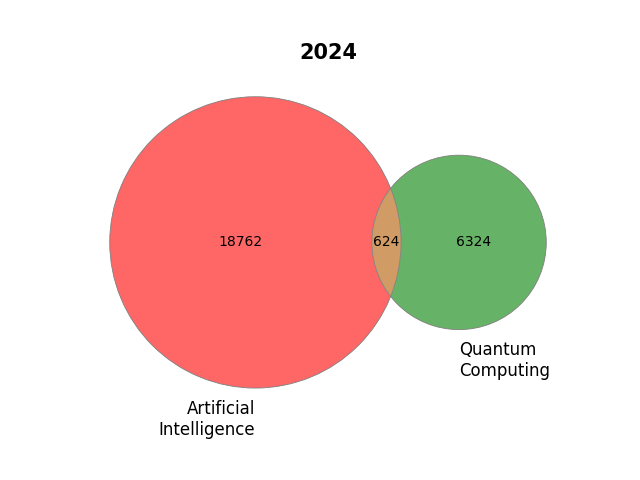
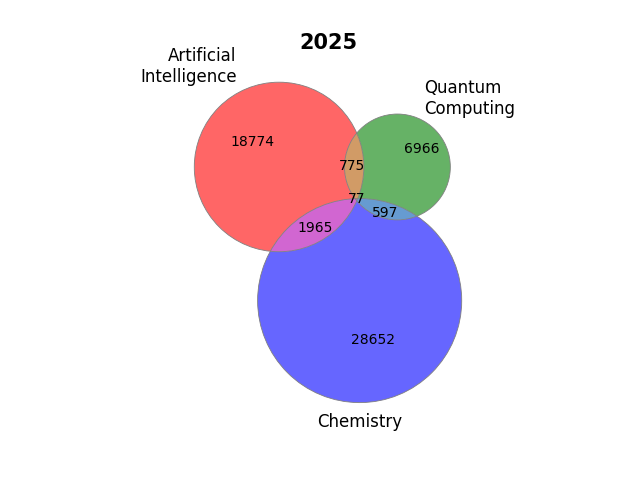
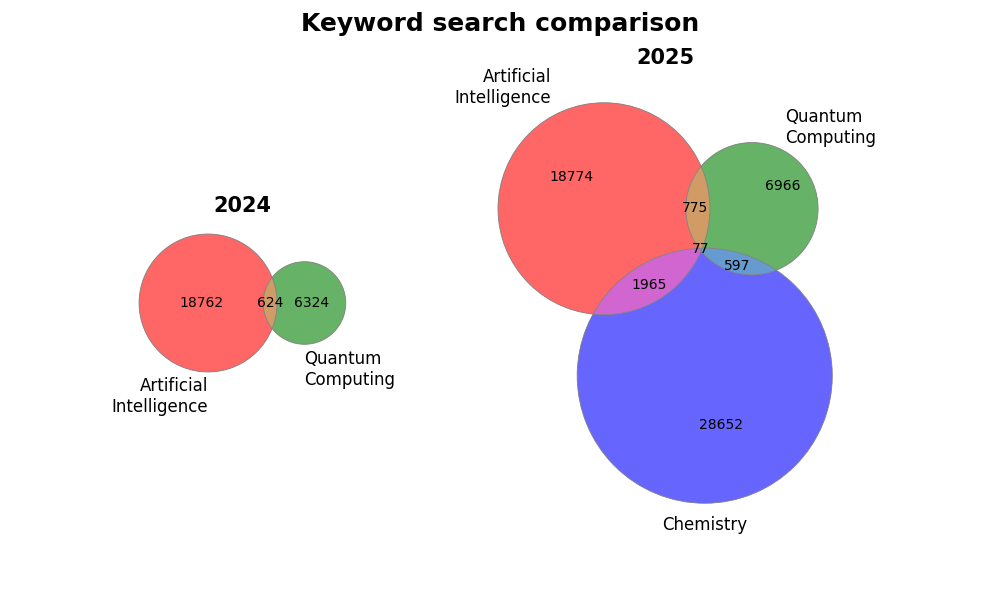
The Venn diagrams below use the local arXiv, bioRxiv, chemRxiv, and medRxiv dumps.
from paperscraper.plotting import plot_venn_two, plot_venn_three, plot_multiple_venn

sizes_2024 = (18762, 6324, 624)
sizes_2025 = (18774, 6966, 775, 28652, 1965, 597, 77)
labels_2024 = ["Artificial\nIntelligence", "Quantum\nComputing"]
labels_2025 = ("Artificial\nIntelligence", "Quantum\nComputing", "Chemistry")

plot_venn_two(
    sizes_2024,
    labels_2024,
    title="2024",
    figpath="assets/ai_quantum_venn_2024.png",
)

plot_venn_three(
    sizes_2025,
    labels_2025,
    title="2025",
    figpath="assets/ai_quantum_chemistry_venn_2025.png",
)

plot_multiple_venn(
    [sizes_2024, sizes_2025],
    [labels_2024, labels_2025],
    titles=["2024", "2025"],
    suptitle="Keyword search comparison",
    gridspec_kw={"width_ratios": [1, 2]},
    figsize=(10, 6),
    figpath="assets/ai_quantum_venn_both.png",
)